Aug 20, 2011

New BlackBerrys improved, but lackluster

Well before the iPhone, BlackBerry gained its "CrackBerry" nickname for its seemingly vital place in users' lives. Lately, however, the surging popularity of Apple's gadget and smartphones running Google's Android software has made the BlackBerry seem less habit-forming.

In response, Research In Motion Ltd. is trying to spice up its product line by releasing several BlackBerrys with touch screens and new software for better performance. In a first for the BlackBerry, a few can run on super-fast "4G" cellular networks, which wireless providers are rolling out.

The phones will be available from the major providers over the next several weeks at a wide range of prices - $50 to $300, with two-year service contracts.

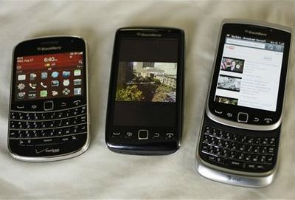
I checked out three: A new version of the high-end Bold, now sporting a touch screen, and two new Torch models, one keeping the slide-out keyboard from before, and the other ditching the physical keyboard.


There are some good features here that will appeal to BlackBerry fans. But chances are many are waiting for devices that run the more advanced QNX software used in RIM's PlayBook tablet computer, which could be coming fairly soon.

Newcomers, meanwhile, are likely to find the new smartphones too boring-looking on the low end and expensive on the high end.

The phones adhere largely to the familiar BlackBerry aesthetic, but with a few twists. They all have the latest version of RIM's operating software, BlackBerry 7. Although it appears quite similar to previous versions, BlackBerry 7 promises a zippier Web browser, voice search and better rendering of graphics.

The most noticeable change was the improved Web-surfing speed. I connected an old BlackBerry Torch with BlackBerry 6 and the new Torch 9810 with version 7 to the same Wi-Fi network. Generally, the new Torch rendered photos and text more quickly. I did notice, though, that at least with The New York Times' website, the older Torch would load entire articles on a single page while the newer phone only gave me the first chunk and forced me to click for the rest.

The browser supports HTML5 support for viewing rich multimedia content (like the iPhone, these BlackBerrys don't support Flash videos).

Also new is voice-activated universal search, which sounds good in theory but was pretty disappointing in practice.

The first step made sense: I tapped an on-screen button to get the voice software to start "listening." But when I was done I had to press another button to tell it I was finished. After a delay to process my request, the phone gave me some options, such as dialing a friend's number, searching for a profile on Facebook or doing a more general search on Microsoft's Bing. I'd have to tap some more to check the options out.

All this screen-touching defeated the purpose of voice search, which should be a largely hands-free endeavor. The feature looks even more dismal when compared with Google's voice search, which can reliably determine when you're done speaking and understands commands for tasks such as calling a friend. It's better than the BlackBerry at figuring out what I'm trying to do, without needing tons of taps to confirm.

Another problem is the lack of apps. The BlackBerry App World includes more than 40,000 apps - a smidgen of the more than 250,000 apps available in Google's Android Market and 425,000 apps available from Apple's App Store. And many of those 40,000 have yet to be updated for BlackBerry 7 phones. I couldn't get one for the review site Yelp when I checked the other day.

The phones all include standard BlackBerry features such as its secure handling of work email and an updated version of the BlackBerry Messenger program. Despite speedy processors and new graphics technology, they sometimes lagged behind when I opened applications.

Each new BlackBerry is equipped with a 5-megapixel camera with a bright flash and plenty of built-in settings for taking different kinds of shots. The cameras can take high-definition videos, too.

The photos I took were reasonably good and the camera performed pretty well in low light, but colors often didn't seem as vibrant as they could be.

In terms of the specific models I tested:

BlackBerry Bold 9900/9930

Despite having by far the smallest screen of the bunch (2.8 inches diagonally), the new Bold merges form and function well. The handset is RIM's skinniest thus far, and it looks like a better-quality handset than the other new releases. I also found its keyboard easiest to use among the three I tested.

The Bold is RIM's first to include an NFC, or near-field communication, chip, which could eventually allow the phone to work as a sort of wireless payment system.

Too bad the phone is so expensive. Sprint will start selling the Bold 9930 on Sunday for $250, while Verizon is hawking it online now for the same price. The Bold 9900, which can work on T-Mobile's high-speed 4G network, will be available Aug. 31 for an even steeper $300 (after a $50 mail-in rebate). You'll need a two-year contract to get any of these prices.

BlackBerry Torch 9850


RIM, a master of the physical keyboard, hasn't had much luck with phones that only include a touch screen. Its early attempts with the BlackBerry Storm were dismal. Although the keyboard-free Torch 9850 looks sleeker, I had a hard time typing, as I kept hitting the wrong letters and numbers.

The phone also seemed to lag behind, spitting out letters well after I'd typed them and not noticing that I was stabbing feverishly at the browser's address bar in an attempt to visit another webpage.

The Torch 9850 will be available Sunday from Sprint for $150 with a two-year contract.

BlackBerry Torch 9810

This phone is definitely the least attractive of the group, but it gets points for its ability to access AT&T's high-speed 4G data network, which makes it quick to download documents or upload photos to Facebook.

The Torch 9810 weighs in at a hefty 5.7 ounces, and its design, which is essentially identical to a previous Torch, looks tired compared with many other smartphones.

Its slide-out keyboard is more cramped than that on the Bold, yet it is still quite good for typing.

What the handset lacks in pizazz it makes up for in price: When AT&T starts selling it on Sunday, it will cost just $50 with a two-year contract.

All of the latest BlackBerrys add several good features, but RIM is still far behind the competition in ease of use and availability of apps.

There will surely be demand from business users whose employers demand BlackBerrys because of their reputation for security. Still, it's hard to imagine them wooing many consumers unless they're already die-hard CrackBerry addicts.


For Wheels 'n' Gadgets Updates, follow us on Twitter or join us on Facebook

Aug 17, 2011

Google launches custom tailored search feature

In a bid to trump Microsoft's Bing, Google will start to populate individual users' search results with posts that have been shared publicly by their connections on Google+.

The new feature, which works only when users are signed in to their Google accounts, aims to tailor results to individual tastes, the company said Friday.

The idea is if a user posts a note on Google+ about a link--be it to a restaurant's Web site, a news story, or a retail store's site--their Google+ connections are going to be more likely to want to see that site as well.

In a blog post, Sagar Kamdar, Google product manager, offered an example of a contact in one of his Google+ Circles posting a note about a Chinese restaurant in New York City.

When Kamdar searches for the restaurant, a note appears below the restaurant link saying his connection shared a post about the establishment.

"Now not only do I get some great reviews on the Web, I get a review from a friend about a restaurant, with recommendations about what dishes to order," Kamdar wrote.

"This is just the latest step in helping you find the most relevant information possible, personalised to your interests and the people you care about," he added.

In May, Microsoft's Bing rolled out a similar feature that elevates results that have received a "like" from a friend on Facebook. Bing's implementation requires users to be logged in to Facebook.

For both Google and Microsoft, the idea is to mimic the real world, where people often rely on friends for advice before making decisions about products, restaurants, hotels, and more, tech news website CNet.com said.

Read more at: http://www.ndtv.com/article/technology/google-launches-custom-made-search-feature-126638&cp


For e-Info Updates, follow us on Twitter or join us on Facebook

Now watch licensed movies on Yahoo!


It is said that over 30 million internet users download and watch 1.7 billion videos every month across India and to tap that online portal Yahoo! has launched Movieplex, which will bring thousands of licensed Bollywood movies to the users. It'll also promote a piracy-free quality entertainment space.

Movieplex is a video space and users can enjoy licensed full-length movies for free. The portal has collaborated with production houses for the same and are offering movies like "Rock On", "Rann", and "Dil To Baccha Hai Ji".

According to a report by market research leader ComScore, the Indian audience is currently spending over 9.1 billion minutes watching online videos each month with entertainment as the leading category in online video content consumption ahead of news and sports content.

Arun Tadanki, managing director, Yahoo!, feels Movieplex would be successful in providing guilt-free entertainment to the consumers.

"Over 30 million internet users consume 1.7 billion videos every month across India. With the increasing demand for online video, both consumers and content providers are looking for a trusted destination where quality content can be consumed in a piracy-free environment at their leisure," he said.

"Movieplex is an example of how Yahoo! connects people to what matters to them the most and Indian movie lovers now have the best full-length movies available to them at their convenience," he added.

One can log onto www.movies.yahoo.in/movieplex to watch the movies without any commercial break!


Read more at: http://www.ndtv.com/article/list/technology/&cp

Aug 16, 2011

Motorola Mobility, Google's biggest buy at $12.5 billion

Mountain View, California:  Google Inc is buying cell phone maker Motorola Mobility Holdings Inc. for $12.5 billion in cash. It's by far Google's biggest acquisition and a sign the online search leader is serious about expanding beyond its core Internet business and setting the agenda in the fast-growing mobile market.

Google will pay $40.00 per share, a 63 percent premium to Motorola's closing price on Friday.
Google's Android operating system runs smart-phones that compete with iPhones, BlackBerrys and Windows-based mobile devices. Motorola Mobility was separated from the rest of Motorola in January. The company has remade itself as a maker of smart-phones based on Android, but has struggled against Apple Inc. and Asian smart-phone makers.


"Motorola Mobility's total commitment to Android has created a natural fit for our two companies," said Google CEO Larry Page in a statement. "Together, we will create amazing user experiences that supercharge the entire Android ecosystem for the benefit of consumers, partners and developers."


The acquisition has the approval of both companies' boards and is expected to close by the end of this year or early 2012. That may be overly ambitious, however, as the deal is likely to face regulatory scrutiny. It dwarfs Google's previous biggest deal, the 2008 purchase of DoubleClick for $3.2 billion, which took a year to get approval.

What Google likely wants from the acquisition is Motorola's trove of more than 17,000 patents on phone technology. Google recently lost out to a consortium that included Microsoft Corp., Apple and Research In Motion Ltd. in bidding for thousands of patents from Novell Inc., a maker of computer-networking software, and Nortel Networks, a Canadian telecom gear maker that is bankrupt and is selling itself off in pieces

Motorola has nearly three times more patents than Nortel.

In premarket trading, shares of Motorola Mobility soared 60 percent, or $14.72, to $39.19. Shares of Google, meanwhile, fell $14.68, or 2.6 percent, to $549.95.

Aug 9, 2011

US rating downgrade may hit IT hiring by 1/4th


NEW DELHI: Hiring activity in the Indian IT sector, one of the biggest employers in the country, could fall by about one-fourth due to the downgrade of the USA's credit rating and the deepening economic crisis, experts said.

It might take at least 5-6 months for the recruitment activities of the IT sector to gain momentum, they said.

"We are expecting overall almost 26 per cent dip in recruitment in IT industries from first quarter of FY'12. It'll take at least 5-6 months to get momentum in hiring in IT industries," MyHiringClub.com Founder and CEO Rajesh Kumar said.

"Due to the economic crisis in the US, the Indian IT job market is also going to be affected badly. The major reason behind this is cost-cutting in Indian companies' US division. In the near future, Indian IT companies having offices in the US are going to face a surplus in their existing manpower strength," he added.

Echoing a similar view, Info Edge (India) Group President (Finance) and CFO Ambarish Raghuvanshi said, "Recruitment would be lagging in the IT space..."

The US accounts for almost 60 per cent of the revenues of the $60 billion Indian IT industry.

Experts believe that job activity in other industries would be negatively impacted as well.

"Apart from IT, hiring activity in other industries is also going to impacted," Concord HR Works CEO Sekhar Ghotgalkar said.

The reaction comes after the US lost its 'AAA' credit rating for the first time in history, as ratings agency S&P was not convinced with the efforts being made to tackle the country's debt problems. This resulted in a bloodbath in the Indian markets.

Most Indian IT firms agreed that while there are fears of another recession in the US and a debt crisis in Europe, it is still too early to know what is coming.

However, the country's two largest software exporters, Infosys and TCS, remain confident of withstanding another downturn.

"It is too early to say. There are fears of another recession in the US and a debt crisis in Europe," Infosys CEO and MD Kris Gopalakrishnan said.

 Read more:http://timesofindia.indiatimes.com/tech/careers/job-trends/US-rating-downgrade-may-hit-IT-hiring-by-1/4th/articleshow/9531491.cms

Aug 1, 2011

Google Tips and Tricks.. Some crazy stuff

Go to " www.google.com " and type in any of the following and then press on ‘I’m Feeling Lucky button’

1) Type in “Google Gravity” and wait a sec to experience the effect of gravity.
2) Type in “French Military Victories” and press "I'm feeling lucky".
3) Type in “elgoog”and the Mirror effect is on.
4) Type in “Google Sphere” and see the spinning effect.
5) Type in “find Chuck Noris” (A must search keyword for al Chuck Norris Fans :D).
6) Type in “who is the cutest” and see who’s so cute and beautiful/handsome.
7) Type in “2204355” and see (You’ve been Chicken Rolled).
8) Type in “Google Loco” and see what’s moving.
9) Type in “ LOL Limewire” and see that you are as a pirate.
10) Type in “Epic Google, Rainbow google, Annoying Google, Google pacman,

Google Magic,Google color (Ex: pink,blue), Early Google, Google Heart
Page.

Jul 24, 2011

Hot browsers for your smartphone


BERLIN: There are more than 70 browsers for personal computers. The choice is not quite as extensive for smartphones, but it makes sense to keep an eye out for alternatives.

The mobile platform Android is especially open but there are programs for other systems specially designed for mobile internet usage. Included in that is also an economical handling of information, automatically filling out of forms, and syncing browser favourites with other devices.


The biggest selection is for the Google system Android. Its standard browser is not identical with Google Chrome but syncs the favourites with its PC version and can automatically fill out forms with repeated input. The 'Google Chrome to Phone' app allows links on a computer with a Chrome browser to be marked and sent to the telephone.

'Even though Chrome and the browser in Android are not identical, both share a lot of the same code,' said Google spokesman Stefan Keuchel. Android users also enjoy very much the Dolphin browser. 'You can surf very comfortably with tabs with it,' said Fabien Roehlinger from the internet portal AndroidPit. Among the pioneers of the mobile browsers is the Norwegian company Opera, which has developed two different programs for smart phones. Opera Mini compresses the web contents on an Opera server before sending it to the browser. This is especially useful if you have a tariff which limits the amount of data transferred and exceeding that limit is very expensive.

'Opera Mini is very beloved because it is economical, fast and intuitively operable,' said Roehlinger. Firefox for Android meanwhile is considered much slower by its users, but Firefox does allow smartphones to sync favourites, opened tabs, form information and passwords with a PC browser.

Another advantage is the 'Do Not Track' function. According to a spokeswoman for the Mozilla project, Valerie Ponell, users can have the comfort of knowing they will not be tracked by such things as personalised online advertising.

In a test by the Australian internet portal Lifehacker, Opera Mini was the faster browser on the Android devices followed by Dolphin, the Android browser, Opera Mobile and Firefox. 

And which browser has the nicest interface? The author of the test, Kevin Purdy, said Opera Mobile 'possibly looks best of all the alternatives'.

If Apple had their way, only its own Safari browser could be used on the iPhone. But a couple of alternatives have made their way into the App Store. The Sphere software blends out all control panels and just shows the websites.

In order to bring the command bar back, the iPhone only needs to be lightly shaken. Also widely distributed is the browser Mercury, which can open many pages in their own tabs and prepare different themes according to the tastes of the user.

If you want to display certain webpages on a different browser, Atomic offers this useful possibility when one wants to avoid the mobile version of a website. Atomic also offers tabs as well as the possibility of differentiating the functions of finger gestures on the display.

The iPhone browser Mango comes from Korea and has been praised in the App Store for its appearance and speed.

Blackberry users often use the Bolt browser as an alternative. The app supports the new web standard HTML5 as well as websites with Flash. In addition, there is also geo-data support so the user can use the GPS function and publish their current position on corresponding websites.

The integrated browser on Symbian mobile phones from Nokia does not have the best reputation. The newly-developed Ovi browser is supposed to be better and utilises an especially efficient technology to compress web data.

As an alternative, there is Opera or the UC browser available for the iPhone, which displays a start page with often-viewed websites.


Read More: http://timesofindia.indiatimes.com/tech/personal-tech/computing/Hot-browsers-for-your-smartphone/articleshow/9336250.cms

Apr 3, 2011

How to make Windows 7 multifunctional


Windows 7 is not just another pretty face. Underneath all those fancy Aero effects , transitions and translucent windows lies an operating system that has a many tricks up its sleeve. These are just a few.

God mode

If there is one single tweak you can do to Windows 7, God Mode should be it. God Mode works with 32-bit and 64-bit versions of Windows 7 and is officially a hidden feature; something you won't find in the user manual. God Mode gives you all possible settings, control panel items, all possible configuration options in one place. To enable God Mode, make a new folder anywhere on the PC and name it GodMode.{ED7BA470-8 E54-465 E-825 C-99712043 E01C}.

The folder icon will instantly change to one that looks like a control panel, and inside the folder you'll get one-click access to all the settings on your computer. The name is actually inconsequential , but a rather clever way of propagating the idea. So, if you use the code "Testing.{ED7BA470-8 E54-465 E-825 C-99712043 E01C}", it still works. These codes are part of Windows Globally Unique Identifiers of GUIDs. A full list of various GUIDs can be found at http:// goo.gl/9311U.

RSS wallpaper

If you're on an unlimited internet plan, you can enable an automatic RSS wallpaper with Windows 7. Many different themes for Windows 7 are available that take advantage of this feature. For example, download the Microsoft Bing theme from http:// goo.gl/iqwlW.

Once downloaded , double click the theme to activate and select the option to download the attachments when prompted. Then, right click on an empty area on the desktop and click 'personalize' to view the themes. Click the newly installed Bing theme and click 'Desktop Backgrounds'.

Here, you can change how often you want the desktop wallpaper to change and select between the wallpapers that have already been downloaded. Many more RSS themes for Windows 7 can be found with a simple search.

Windows 7 as Wi-Fi router

A free prog RAM called Connectify (www.connectify.me) works with Windows 7 to turn it into a Wi-Fi router, so that other nearby devices can connect and use the PC's internet connection.

This virtual Wi-Fi feature is only available in Windows 7 and it becomes possible to use the wireless adapter as a wireless hotspot. Another open-source software that does the same thing is Virtual Router Manager (http:// virtualrouter .codeplex.com).

Problem steps recorder

This Windows 7 tool can help you retrace any steps that lead to a problem you are facing. For example, if a certain sequence of events is leading to an error message, you can record your actions with the Problem Steps Recorder (PSR) and send it to a friend for diagnosis. To start the PSR, simply click the start button, type PSR and hit enter.

In the window that pops up, click the record button and perform the action needed. Once finished, give the file a name and it will get saved as a zip, including the problem details and screenshots of the actions you performed along the way.

Display colour calibration

Most laptop and desktop monitors are not properly colour calibrated, with the result that what you see onscreen may not be the same as what you print or what you see on other screens.

For a quick colour calibration of your display, click the Start button, type DCCW and hit enter. The Display Colour Calibration tool will start, to provide a guided, stepby-step process (In case you are using multiple monitors, move the DCCW window to the display you want to calibrate).

Automatic docking

These handy shortcuts can help with window docking; rather than resize windows manually (which is always an option), use the Windows key in combination with the four cursor keys to dock the active window in various locations.

Clicking Win + left will dock the active window to the left half of the screen, Win + up will maximize, Win + down will minimize and so on.

Mouse gestures

Windows 7 includes some helpful mouse gestures that work as shortcuts . If you have several programs open, to access the jump list (contextual menu) for each, you would normally right click on the program's icon in the taskbar. But if you left click and drag the cursor upwards, it performs the same action.

Or if you click and drag a window to the top of the screen, it maximizes the window. Drag it to the left or the right and the window will get docked to the left or right of the screen.

Customise the shut down button

The Windows 7 start menu is quite different from previous versions. If you need to Sleep or Hibernate the PC for example, you have to click the Start button and then click on the appropriate action in a sub menu.

To customize what the Shut Down button does, right click the Start button and click properties. Under the Start Menu tab, you can choose the default action for the Shut Down button.

Ready boost on steroids

Ready Boost is a Windows feature that uses a USB flash drive to provide an instant speed boost to your system. The feature uses the additional space on a USB drive as RAM and therefore the USB drive has to meet speed requirements to be used as a Ready Boost drive.

To check a USB flash drive for Ready Boost compatibility or to enable Ready Boost, simply plug a drive into an available port, open 'My Computer' , right click on the drive's icon and click 'Properties' . Here, you will see a tab for Ready Boost.

Note that you can either set a portion of the drive or the entire available space to be used for Ready Boost, but you will not be able to use that allocated space for anything else.

Ready Boost was also available on Windows Vista, but with Windows 7, the feature has been enhanced to include support for multiple drives and higher capacities . With Windows 7, if you have enough free USB ports and flash drives lying around, you can use them to provide a massive speed boost to your system.

Zany keyboard shortcuts
The Windows + Home key minimizes everything except the current window, Win + G displays the desktop gadgets in front of other windows, Win + + (plus key) activates the magnifier and enlarges the area of the screen you are looking at you can Shift + left click any window on the taskbar to open another instance of it. Some power users like to keep multiple instances and multiple windows running.

So for example, if you have 10 Windows explorer windows, and 10 each of Word, Excel and PowerPoint documents open, using the standard Alt+Tab method to switch between them will be time consuming. Just hold down Ctrl + click on any explorer icon in the taskbar to cycle through only the explorer windows.

Mar 10, 2011

'World's first' glasses-free 3D TV hits stores


TOKYO: Toshiba has launched what it calls the world's first television that allows viewers to see 3D images without the need to wear special glasses, amid intensifying competition in the market.

Curious shoppers stopped to test out the screen at an electronics store in central Tokyo (Japan) as the 12-inch model of Regza GL1 Series went on sale.

The new model with a liquid crystal display carries a price tag of 119,800 yen (1,400 dollars). A 20-inch model will be released on Saturday.

The new 3D TV does not require users to wear special glasses, whereas other 3D-capable models require glasses that act as filters to separate images to each eye to create the illusion of depth.

Toshiba's screens use processing technology to create depth-filled images and the Regza GL1 Series allow users to switch between 2D and 3D on normal TV programmes.

Kazuhito Gunji, a public relations official at electronics retailer Bic Camera, said the company had received many inquiries from customers on when they can get their hands on the product.

Electronics stores are hoping that the release of the latest technology will help offset declining sales as government incentives for purchasing environment-friendly home appliances were reduced this month.

The hugely competitive TV sector is a challenge for many electronics makers given that customers are increasingly accustomed to declining prices, making it difficult for the industry to generate profits.

Sony on Monday said it may fall short of its sales goal of 25 million liquid crystal display TV sets this fiscal year as it struggles to be profitable in the sector, and has also embraced 3D TV technology.

Most shoppers were curious but also cautious about the new device on Wednesday, however.

"I want to watch on a big screen," said a 47-year-old man who has a 37-inch TV at home. "I'll wait for another year before buying," he said.

Another customer, 33, said: "It's great that we don't have to wear glasses, which is a nuisance."

"But I didn't feel images were flying out of the screen on some programmes," he added.

Toshiba says images on the 12-inch screen are best viewed from the front and some 65 centimetres (26 inches) away.

"Customers currently think of 3D images as just an add-on function... but 3D is expected to become a standard eventually" with 3D films and video titles increasing, said Toshiba sales official Eiichi Matsuzawa.

Rival Sharp earlier this year unveiled a small glasses-free LCD touchscreen that shows 3D images for use in mobile phones, digital cameras and games consoles such as Nintendo's 3DS, to be released in Japan in February 2011.

rEAD mORE: http://timesofindia.indiatimes.com/tech/personal-tech/computing/Worlds-first-glasses-free-3D-TV-hits-stores/articleshow/7144218.cms

What iPad 2 has that iPad doesn't


WASHINGTON: When Apple's original iPad was released around this time last year, the device not only created the biggest buzz in the tech world. It also defined a new category of gadget. But as enthusiastic as reviewers and early adopters of the device were, consistent criticisms surfaced as well.

The iPad's lack of USB or Ethernet ports and glossy screen were consistently cited as shortcomings, for example. .


Now, though, Apple is upping the ante again with the unveiling of iPad 2, due out in the US on March 11 and in other countries over the weeks that follow. Will the latest iPad solve the problems of the original or get you to want to hand over your hard-earned cash for one? Read on...

What's new
Apple has made the iPad 2 faster, thinner, lighter, more powerful, and more versatile than the original iPad. And it has done so while keeping the starting price -- at about $499 for a base model -- the same as the previous generation iPad.

Notable features are a dual-core processor at the heart of the device, which Apple claims is twice as fast as the previous iPad, more powerful graphics designed to do justice to fast-moving games, battery life that's better than the original iPad by about an hour, and, perhaps most interesting, two integrated cameras -- one on the front and one on the back.

The two cameras are there so that you can use the device for different purposes. The camera that faces you as you look into the iPad 2, for example, can be used to capture your image for the purposes of video chats or Skype video sessions. The other camera can be used as a more traditional movie or still camera. Point your iPad at something you want to film, and let it roll.

Apple has also taken note of the most useful accessory that owners of the previous generation procured for their device -- a cover for the screen -- and included one with the unit. It's not just any cover, however. It can be folded in upon itself several times and turned into a stand that makes the device easy to view while sitting on a desk or your lap.

The iPad2 also sports upgraded WiFi compatible, with the 802.11n as standard. 3G connectivity is also standard, for use with mobile carrier networks that support it.

Finally, the device's interface boasts features that iPhone 4 users enjoy like 'multi-touch' technology, which enables you to move and manipulate objects on the screen with your fingers in a very intuitive manner.

Does it fixes the shortcomings of the previous model
If you're talking about the original iPad's lack of a USB or Ethernet port, you'll have to keep waiting. Some also complained that the original iPad lacked a memory card slot. So does the iPad 2.

Complaints such as these are made by those worrying how they will connect the iPad to various data sources. Apple does sell an iPad Camera Connection kit, however, that allows you to import photos and videos from a digital camera using the camera's USB cable or an SD card.

Some also complained about the original iPad's screen, claiming that while it was fine for surfing the web, playing games, and viewing multimedia content, it was not as well suited to long periods of reading.

The same holds true for iPad 2, which has a backlit screen rather than the E Ink non-backlit screen that devices such as Amazon's Kindle sport. The iPad 2, in short, is less of an eReader than it is a general media consumption and creation device.

Perhaps even more disappointing, the iPad 2 does not even incorporate a larger version of the iPhone 4's 'retina display' technology, which renders graphics and text at a resolution so fine that the human eye cannot detect pixellation.

How much will the iPad 2 really cost?
With the base model of the iPad 2, you get WiFi connectivity and 16GB of memory; the next model up, with 32GB, will retail for around $100 more; the next higher model, with 64GB, will cost yet another $100.

There's another class of iPad 2, however, with both WiFi and 3G connectivity. This series starts at $629, again with more memory increasing the price by $100 each time.

You'll want the WiFi + 3G model if you wish to connect the device to information sources both at home and while on the road.

rEAD mORE: http://timesofindia.indiatimes.com/tech/personal-tech/computing/What-iPad-2-has-that-iPad-doesnt/articleshow/7645187.cms

Review: Apple iPad 2

SAN FRANCISCO: With the original iPad, Apple brought an attractive, easy-to-use tablet computer to the masses at a reasonable price -- a feat numerous companies are trying to top.

With Friday's release of the iPad 2, Apple is pulling further ahead, with improvements that make an already excellent tablet even more enticing. It goes to show that when it comes to tablets, Apple refuses to be bested.

The new iPad is skinnier, faster and slightly lighter. It comes with cameras for video chatting and snapping photos, while keeping the same prices, ranging from $499 to $829 depending on the configuration.

Competitors such as Motorola Mobility Holdings Inc and Samsung Electronics Co sell good tablets of their own, with many of the same features. Motorola's new Xoom even has a higher-resolution screen than the iPad. Still, nobody has been able to match the iPad's simplicity, innovation and style.

The iPad 2 looks much like the first iPad, though it has a sleeker, lighter body with a curved back. All this helps the tablet fit more naturally in my hands, and the modified shape makes it easier to hold for extended e-reading sessions, for example.

Among the most noticeable changes is the inclusion of cameras, one on the front and one on the back. This is something I've been hankering for, as the iPad's crisp display, measuring 9.7 inches diagonally, seemed like the ideal canvas for video chat. The subsequent arrival of several tablets with front and rear cameras made it practically a necessity for iPad 2.

Fortunately, Apple thought so, too. Both cameras on the iPad 2 work with the company's FaceTime video chat application and the back camera shoots high-definition videos.

A friend I chatted with over FaceTime moved pretty smoothly on the iPad's screen, though the image could have been much sharper. With the front camera, my friend could see me. If I switched to the back camera, I could show him my surroundings.

You can take still photos, too, though I found this awkward given the tablet's size. The results were not fantastic, but self-portrait fans will find the front-facing camera useful for composing new profile photos for Facebook.

The new iPad has Apple's new dual-core A5 chip, which helped applications open more quickly than on the older iPad. The original never felt slow, but the faster I can start a new game of "Plants vs. Zombies," the better.

Add to that a new version of Apple's iOS software. The new processor and the new iOS combined to improve Web surfing, as I could load up pages noticeably faster over my home Wi-Fi network. As expected, videos loaded quickly and generally streamed flawlessly.

The new software allows you to share music and videos from your iTunes library on multiple Apple devices on the same Wi-Fi network. And it now lets you set the iPad's mute switch to function as a screen lock, which makes it even easier to prevent my Netflix movie from rotating mid-scene just because I've shifted my butt on the couch.

The updated iOS comes with iPad 2 and is available as a free download for the original iPad and the two most recent models of the iPhone and iPod Touch.

On Friday, Apple is also rolling out iPad versions of its iMovie video-editing software and GarageBand software for recording and editing music. I tried GarageBand ($5) and was wowed by how simple it was and how well it took advantage of the iPad's touch screen.

If you're musically inclined, you can pick up your guitar and adjust its sound through GarageBand's bevy of amplifiers and effects pedals. If you don't play an instrument (or feel lazy), you can swipe through a list of "smart" virtual instruments. A guitar with preset chords lets you strum by swiping the screen. You can arrange drums on a grid based on how noisy and complicated you want the beat to sound.

The coolest part is how sensitive the virtual instruments are. Start beating your fingers on a virtual drum kit, and you can hit the drums and cymbals harder or softer. You'll get different sounds if you hit the ride cymbal in different places, and you can even tap the rim of the snare instead of just hitting the drum itself.

It's quick and easy to record and edit songs, then save or email them to a friend (who will hopefully applaud your artistic endeavors).

When playing back my musical masterpiece and other content on the iPad 2 I did long for a second speaker -- there is just one on its back. Fortunately, that lone speaker did sound quite crisp, even with the sound turned all the way up.

Like the first iPad, the iPad 2 is rated for up to 10 hours of battery life, and it performed like a champ. Playing a mix of videos streamed from YouTube over Wi-Fi and saved on the iPad itself, I got a bit more than 10 hours of entertainment before it died.

You can buy versions that work with either AT&T's or Verizon Wireless' cellular network, rather than just AT&T before. The cheapest model connects only through Wi-Fi. You can also get it in black or white --before, your only option was black.

Read More: http://timesofindia.indiatimes.com/tech/personal-tech/gadgets-special/Review-Apple-iPad-2/articleshow/7669848.cms

 
Design by Free WordPress Themes | Bloggerized by Lasantha - Premium Blogger Themes | Hot Sonakshi Sinha, Car Price in India