


Jan 20, 2011
Jan 17, 2011
6 ways to increase Traffic to ur website

While big-box retailers spend millions to grab attention with sales and promotions, many small business owners struggle to keep up. But having a strong online presence and a strategy for driving traffic to your brick-and-mortar store is an affordable and effective way to stay competitive.
From there, take the following steps to quickly and cost-effectively increase website traffic and, subsequently, foot traffic.
Clean design
Do not clutter pages with unnecessary information, as it will just confuse potential customers and drive them away without giving your company a chance. This is especially important with Google Instant, which enables consumers to see a small preview of your site within their search results.
Optimize your website for search engines
Have searchable words, images, and page titles for search engine optimization.
Make sure customers know how to get to you
Store location and hours need to be up-front and clear on your website. Also make sure your address links to Google Maps so the user can receive quick, easy directions.
Shoppers love coupons
Use your website to post coupons that are only redeemable at your store to incentivize new and existing customers. If coupons are a regular occurrence on your site, people will continue to come back again and again.
Create an event
People want to interact in an authentic way, but face-to-face community can't be achieved in cyberspace. Use your website as a springboard to events at your store such as hosting appetizers or hiring live musicians.
Use the entire Web
Although your website may be your primary marketing piece, make sure you use the entire Web to drive traffic to your shop using tools such as Facebook and Twitter. This gives your customers multiple opportunities to hear about your business. The goal is to use the entire Web to create a culture around your company, and inform clients and customers about what is happening.
Read more: 6 Tips to drive traffic to your website - The Times of India http://timesofindia.indiatimes.com/tech/personal-tech/computing/6-Tips-to-drive-traffic-to-your-website/articleshow/7291771.cms#ixzz1BHiV4dRD

Jan 3, 2011
USB goes 10X faster - USB 3.0

Not only will 3.0's theoretical 10x speed advantage over 2.0 make fast external storage a reality, but its ability to send and receive data simultaneously will mean that a wide range of peripherals that bumped up against the limits of 2.0's data transfer rate will be able to adopt USB wholeheartedly. In 2011, don't buy a desktop or notebook PC that's not equipped with the improved USB standard.
GB goes obsolete

Think big and fast in 2011. Traditional mechanical hard drives will be available in 3-terabyte (TB) capacities and larger - and at prices that will be budget-friendly.
Speed freaks, though, will want to look at the upcoming crop of solid state drives (SSDs), which will take full advantage of the newest 6 gigabit per second (Gb/s) SATA drive connectivity standard to pump data through your PC at roughly twice the speed of today's widespread 3 Gb/s standard.
SSDs will continue to command a price premium in 2011, but increasing capacities overall will bring down prices on the units that are currently the costliest. For those who have been waiting for SSDs to get big enough to be interesting, expect 600 gigabyte (GB) drives to appear early in the year.
Social networking warfare

Upstarts like Facebook and Twitter took the world by storm in 2010. Will tech heavyweights like Google stand by and watch success like that go unchallenged? Unlikely.
Twitter's 140-character niche may be tough to replicate, but expect 2011 to see competitors attempt to chip away at Facebook's success. Google is currently rumoured to have a 'Google Me' product in the wings, which is expected to give Facebook some competition in 2011. Others are likely to follow suit.
Dec 21, 2010
Jackass IT: Stunts, idiocy, and hero hacks
Sometimes you have to get a little crazy to find the right solution to technology problems gone absurd

Whether you're keeping vital systems humming, extending the life of faulty hardware in dire situations, or simply hunting for sport, knowing when to throw out the manual and do something borderline irresponsible is essential to day-to-day IT work.
Here are a few poignant examples of stunts and solutions that required a touch of inspired insanity to pull off.
Jackass IT stunt No. 1: Route city services through a laptop
Ever wonder whether you could route an entire city network through a laptop running Fedora? Take a seat. Or better yet, leave the chair for your laptop. You'll need to balance it somewhere to keep city services up and operational through a two-day snowstorm.
It started out innocently, with a sizable city network core Layer 3 switch showing signs of failure and causing network instability. Errors logged to the console pinpointed the supervisor engine. Cisco was called around 10 a.m., and a replacement was slated for delivery by 2 p.m. As long as the current supervisor could keep the network more or less functional for four hours, help was on the way.
Cue Mother Nature and her blizzard machine. The call came back at noon. There was no way to get the proper part to the site before the following day due to the storm. As luck would have it, the production supervisor finally gave out minutes later, and the city's fiber network went dark. With no backup Layer 3 supervisor engine and several hundred ports in that switch, including all the servers and edge switch trunk links, there didn't seem to be anything that could be done until the next day, leaving city services bereft, including the police and fire departments.
A compatible Layer 2 supervisor for the core switch was located on site, and a plan was hatched. While this new supervisor wouldn't bring the network up by itself, it could run the switch ports on the core -- and a laptop could do the rest.
Read More:
Jackass IT stunt No. 1: Route city services through a laptop
Ever wonder whether you could route an entire city network through a laptop running Fedora? Take a seat. Or better yet, leave the chair for your laptop. You'll need to balance it somewhere to keep city services up and operational through a two-day snowstorm.
It started out innocently, with a sizable city network core Layer 3 switch showing signs of failure and causing network instability. Errors logged to the console pinpointed the supervisor engine. Cisco was called around 10 a.m., and a replacement was slated for delivery by 2 p.m. As long as the current supervisor could keep the network more or less functional for four hours, help was on the way.
Cue Mother Nature and her blizzard machine. The call came back at noon. There was no way to get the proper part to the site before the following day due to the storm. As luck would have it, the production supervisor finally gave out minutes later, and the city's fiber network went dark. With no backup Layer 3 supervisor engine and several hundred ports in that switch, including all the servers and edge switch trunk links, there didn't seem to be anything that could be done until the next day, leaving city services bereft, including the police and fire departments.
A compatible Layer 2 supervisor for the core switch was located on site, and a plan was hatched. While this new supervisor wouldn't bring the network up by itself, it could run the switch ports on the core -- and a laptop could do the rest.
Read More:
First look: Chrome OS beta's Achilles' heel is its reliance on the Web
In its first public version, the forthcoming cloud-based alternative to Windows and Mac OS X is too limited by -- ironically -- the cloud

Google announced Chrome OS in July 2009, formally introduced it 13 months ago, and then went silent. Last week, it re-introduced Chrome OS and this time gave an ETA for the real thing: mid-2011. It also distributed prototype "Chromebook" laptops to people like me for ongoing testing of what Google CEO Eric Schmidt said would be an alternative to both Windows and Mac OS X. I've now had some quality time with that laptop, its Chrome OS, and the early apps available for the platform.
Chrome OS could be an option for grandmas and office drones: people who do very basic tasks, have a single email account, don't often share documents and data with other applications, don't use professional features such as revisions tracking when editing documents, and work with just forms. At this stage, the Web apps available for Web browsers such as Chrome OS -- including Microsoft Office Web Apps, Google Docs, and the first apps available at Google's new Chrome Web Store -- are rudimentary at best. And they don't play well with each other.
Unless Google and others succeed in developing really compelling Web apps that also operate with the rest of the Web, I believe the concept of a cloud laptop will fail. Yes, Office and many other apps are way too complicated, but Chrome apps are today way too simplistic and limited. I would point Google and Chrome developers to the apps you see on the iPad as examples of a better balance between simplicity and capability, where sophistication is not sacrificed.
It's clear that Google still has a long way to go to make Chrome OS viable; six months out from formal rollout, the operating system and the apps are in no way ready for prime time. I'm frankly surprised how primitive it all is half a year away from launch, but Google did warn that it has work to do. Maybe there's a lot going on behind the scenes that will quckly come together to make Chrome OS worth considering when it is formally released. Anyhow, keep Chrome OS' early nature in mind -- the prototype laptops, for example, aren't even running a beta version of the Chrome 9 browser that they'll ship with, but instead use a version of today's Chrome 8 browser.
Dec 17, 2010
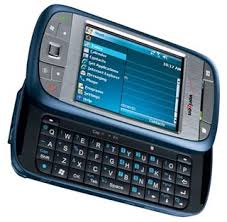
Top 15 smartphones launched in 2010
Dec 14, 2010
Here r some of the common and new win 7 shortcuts

Win+M: This shortcut minimizes all open windows and programs instantly. Comes in handy when you want to quickly go to the Windows homescreen without manually minimizing the open windows one-by-one.
Win+Shift+M: Maximize all running windows
Win+F: Open the Search window
Alt+Esc: Has the same functionality as Alt+Tab shortcut but with one difference, it toggles the windows in the order they were opened.
Win+Home: this shortcut minimizes all running programs except the one you are currently running.
Win+T: Cycle through taskbar programs, i.e. preview thumbnails one by one and once you are on the program you want to open now, hit Space or Enter
Win+ hit number (1-9): Starts the application in the taskbar in that position
Win+Up/Down: Restores or maximizes the current open window
Ctrl+Shift+N: To create a new folder in the directory
Alt+P: Toggles the preview pane in Windows Explorer
Win+G: Cycle between the Windows Gadgets on your screen
Alt+F4: When focused on the desktop will bring up Shut Down window


Top Twitter trends of 2010
Read More: http://timesofindia.indiatimes.com/tech/itslideshow/7093403.cms


